Reader-supported: no affiliate links active yet — our rankings can't be bought. How we rank →
I Built MileVoxa Because I Couldn’t Tell If My Truck Was Making Money

On this page
Full disclosure up front: I built MileVoxa. This isn’t a review — it’s the story of why a truck driver started building software, what the thing actually does, and why it’s free right now.
Here’s the short version. For years I ran my truck the way most owner-operators do: a spreadsheet when I was disciplined, a glove box full of receipts when I wasn’t, and gut feel the rest of the time. Every Friday I’d ask myself the same question — did I actually make money this week? — and I could never answer it with a number I trusted.
MileVoxa is my answer to that question. It’s a business-management app for owner-operators and small fleets: you enter your loads and expenses, and it computes your real profit — per load and per week. It’s in free public beta right now. No credit card, no catch.
The Friday-night question
Talk to owner-operators long enough and you hear the same story in different words. The money comes in — a $6,700 load here, a $5,300 load there — and it goes out just as fast: diesel, truck payment, insurance, tolls, maintenance, the company cut. At the end of the week there’s a number in the bank account, but nobody can tell you what the business made.
Most drivers I know run on Excel or Google Sheets. Some still run on paper. A few run on pure gut feel — “the truck’s rolling, so we’re fine.” The problem isn’t effort. Plenty of disciplined drivers keep beautiful spreadsheets. The problem is that a spreadsheet tells you what you typed into it, and revenue is not profit. A $6,700 load can still lose you money once the fuel, the fixed costs, and the fees come out. Nobody’s spreadsheet ever told them that on a Friday night.
I watched too many good drivers work hard all year and end it unsure whether they were building something or just wearing out a truck. That’s the problem I set out to solve.
Why I built it instead of buying it
There are trucking software products out there. I looked. What I didn’t find was the thing I actually needed: one place where the whole business picture lives — loads, expenses, fuel, maintenance, documents, settlements — built for a driver, not an accounting department. Something that makes the daily work easy instead of adding to it, shows you deep detail on how the business is really going, and answers one question honestly: what’s my real profit?
So I built it. MileVoxa is the tool I wished someone had handed me when I started: enter your loads, enter your expenses, and the app does the math. It’s for owner-operators and small fleets — the people doing the driving and the books, usually at a truck stop table at 9 PM.
What MileVoxa actually does
No pitch. Here’s what’s in the app today, in plain words.
Screenshots in this article are from my own demo account — your numbers will be yours.
Your real profit, every week
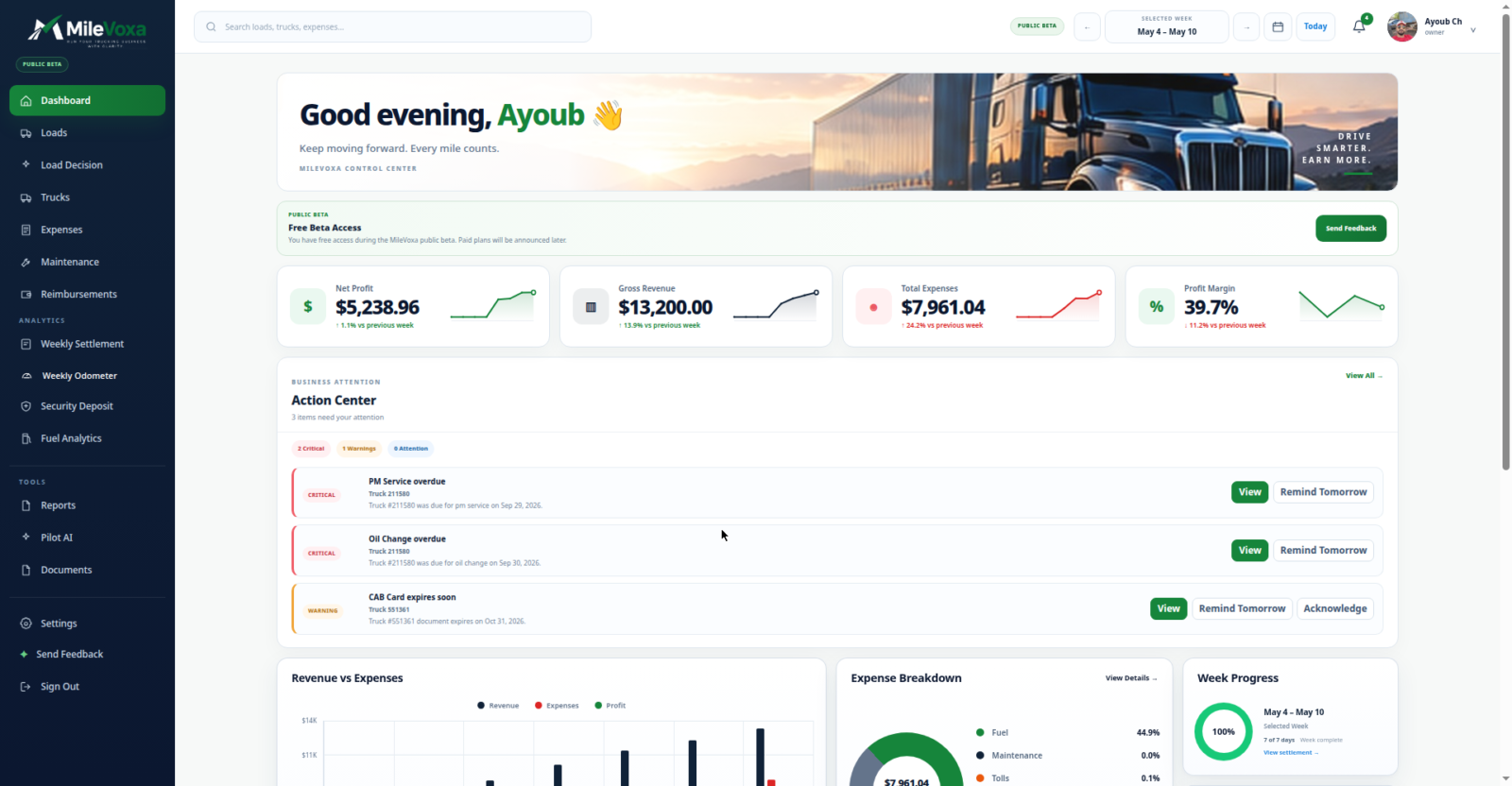
The dashboard is the first screen for a reason. It shows the week: net profit, gross revenue, total expenses, and margin. Below that, where the money went — fuel, truck payment, insurance, tolls, other — broken out by category. And an Action Center that flags what needs you: a PM service that’s overdue, an oil change you missed, a CAB card about to expire.
In our own demo account, one week showed $13,200 in gross revenue and $5,238.96 in net profit. That’s our test data — I’m showing you the shape of the screen, not promising your numbers.
Every load’s numbers in one place
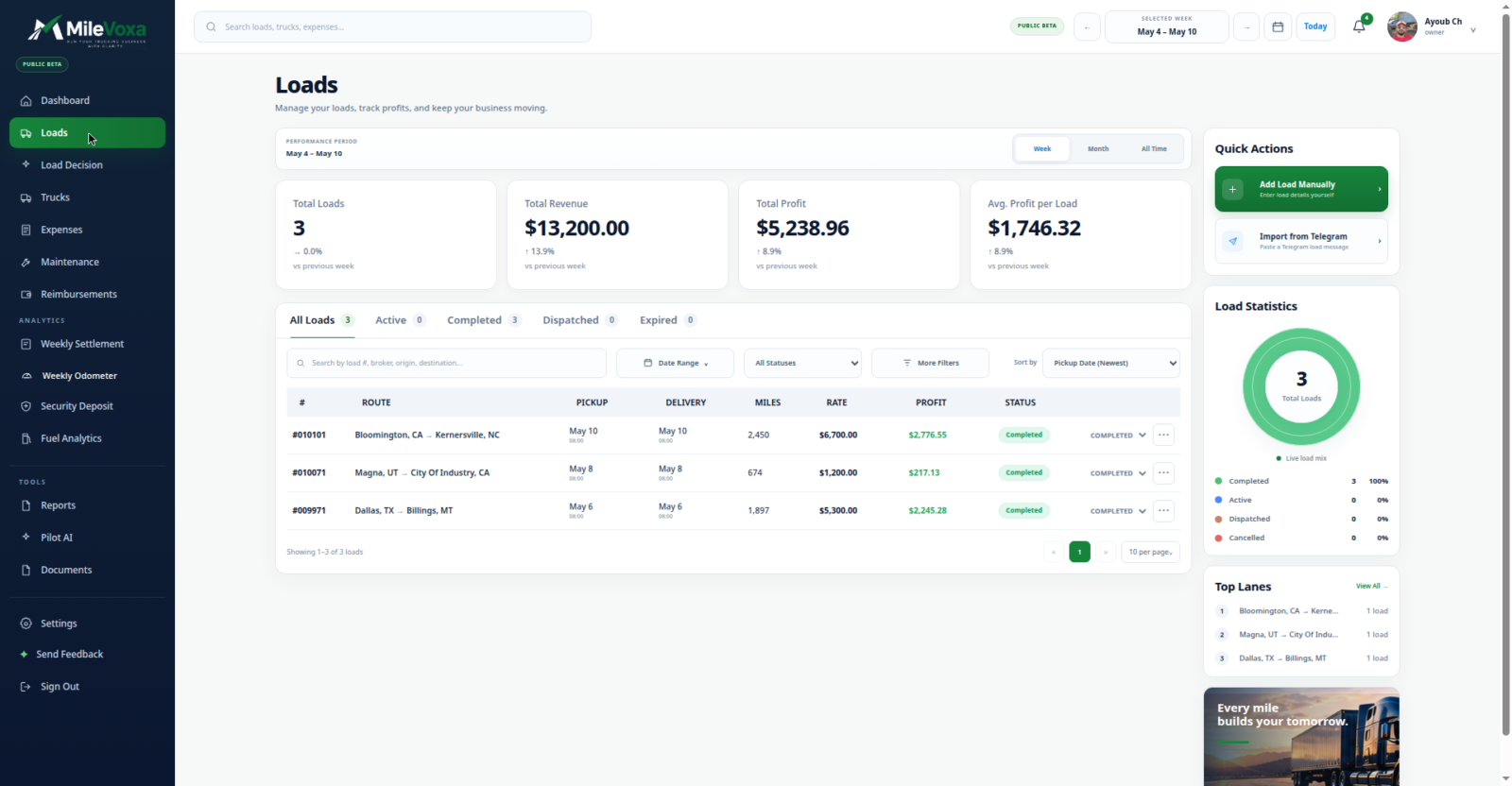
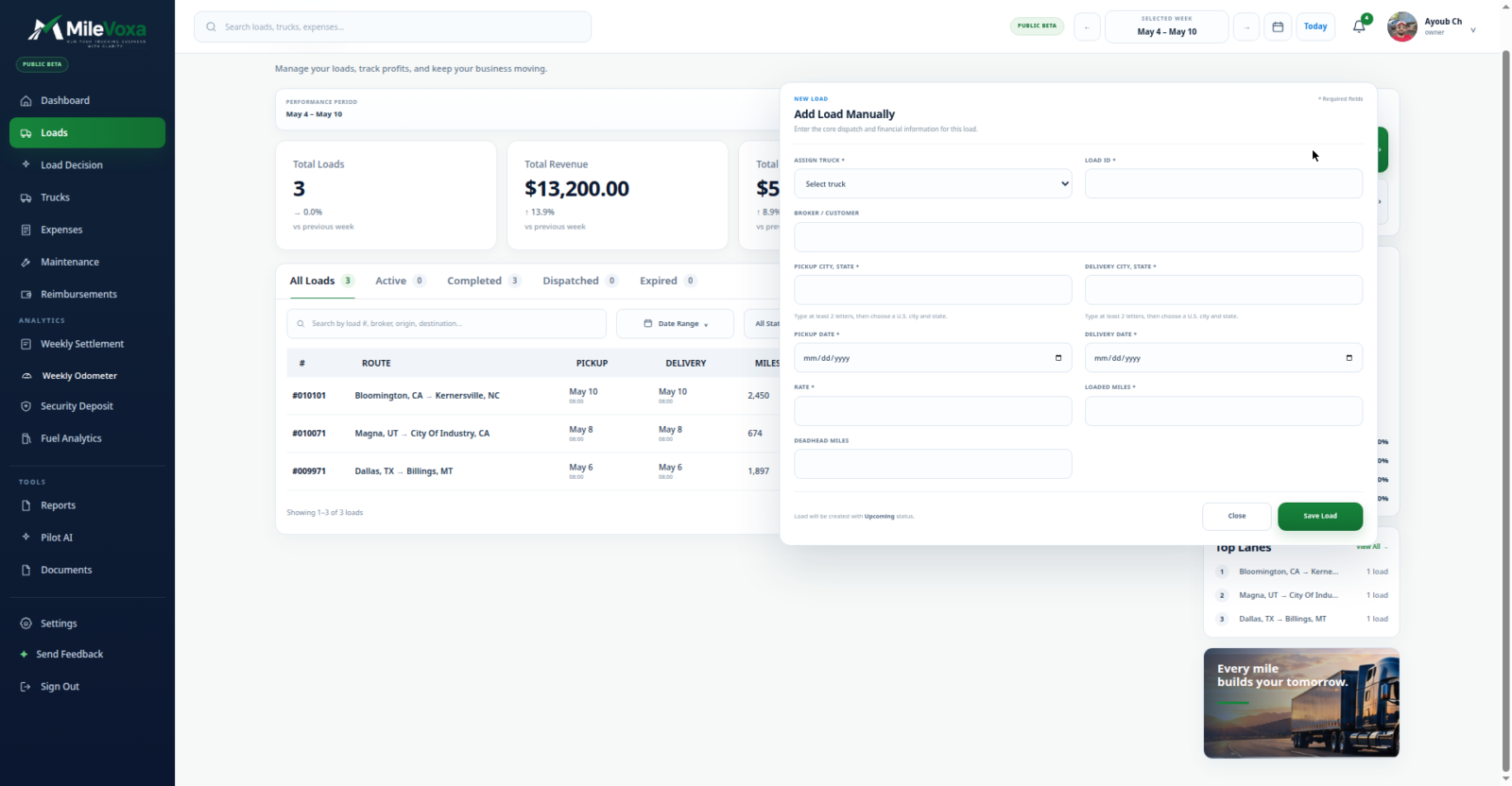
Every load lives in one list with its revenue, miles, and deadhead. Adding one is a dialog — enter it manually or import it from a file — with the load number filled in for you. Broker or customer name, commodity, weight, reference number, dates. Nothing fancy, everything where you’d look for it.
Expenses without the shoebox
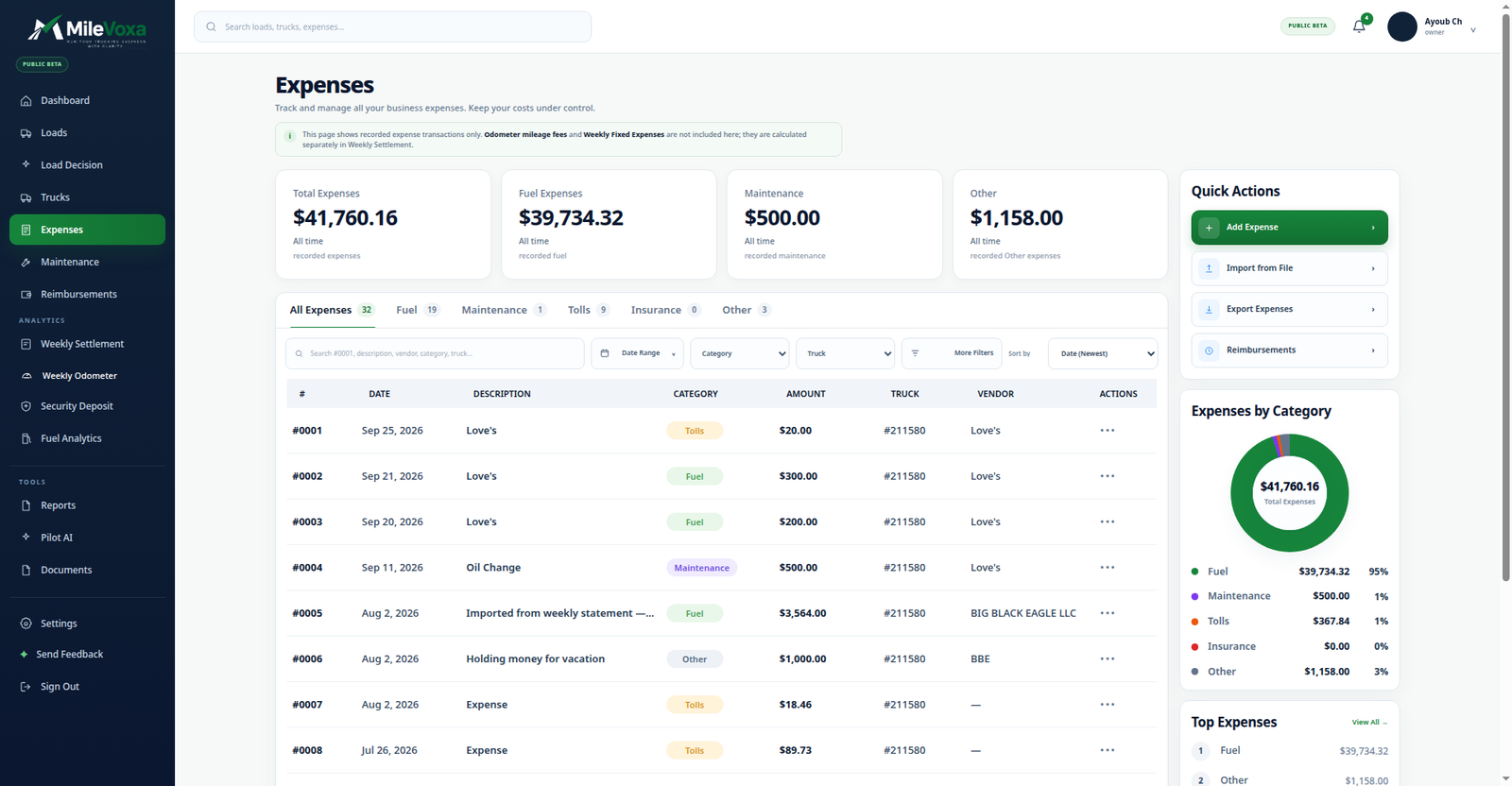
Every expense gets a category — fuel, maintenance, tolls, insurance, other — plus the vendor, the truck, gallons and price per gallon where it applies, and a photo of the receipt. Each expense is assigned to a load, so the math ties out instead of living in two places.
Fuel: where the diesel money goes
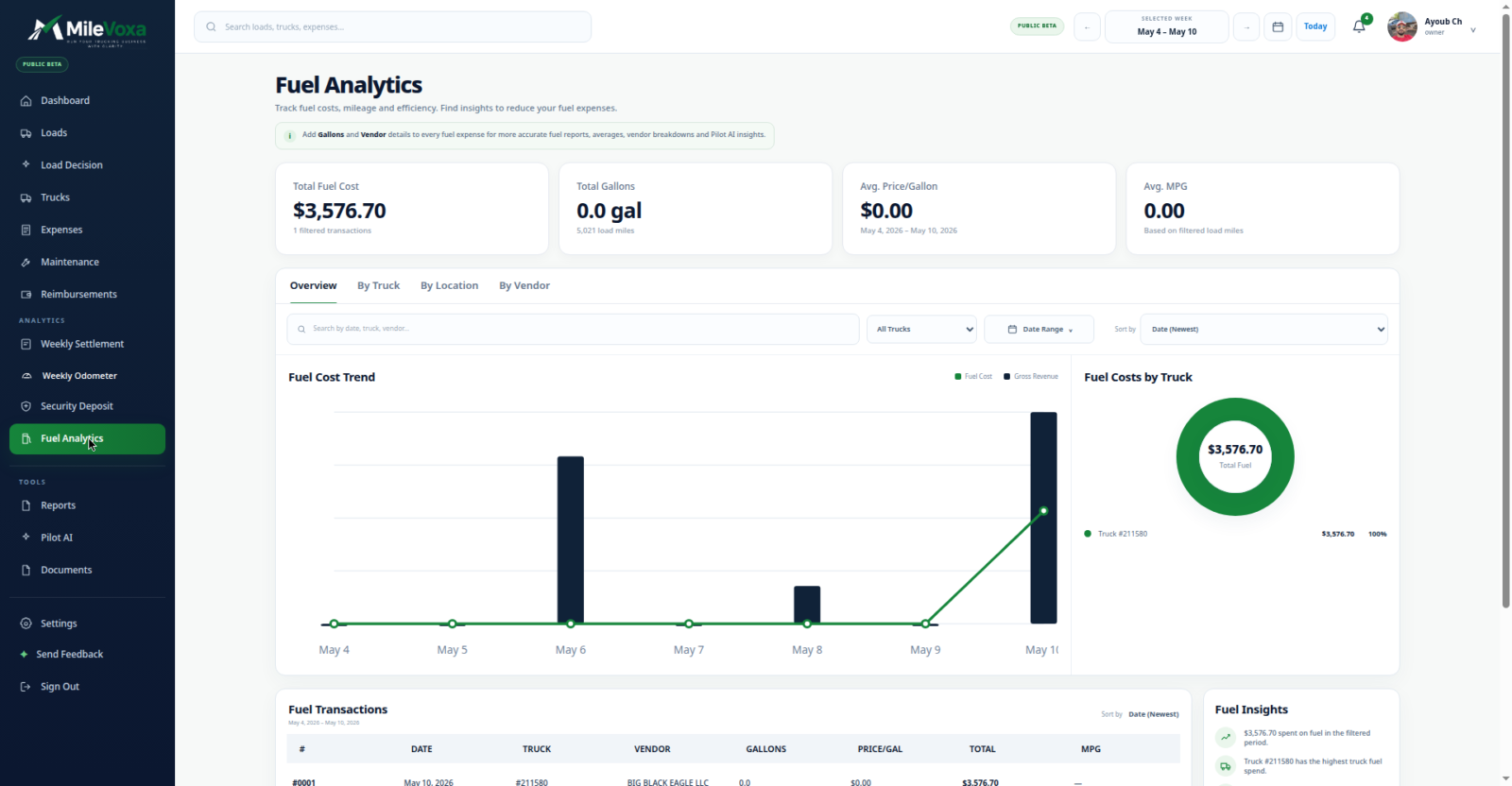
Fuel analytics breaks your diesel spend down by truck, location, and vendor. Enter gallons and price per gallon on each fuel stop and the picture gets sharper — you’ll see which truck and which stops are eating the budget.
Maintenance and documents: never miss a renewal
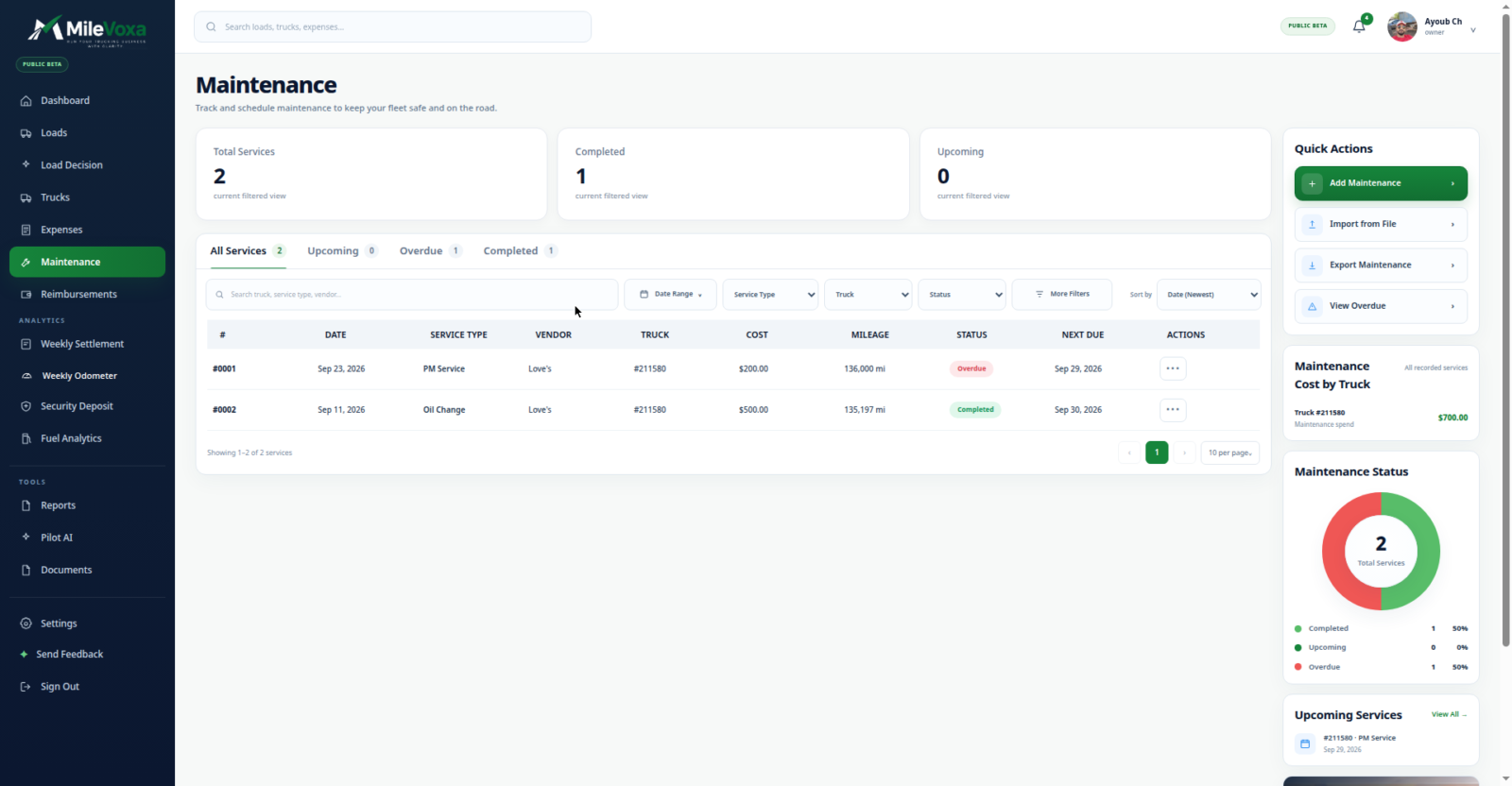
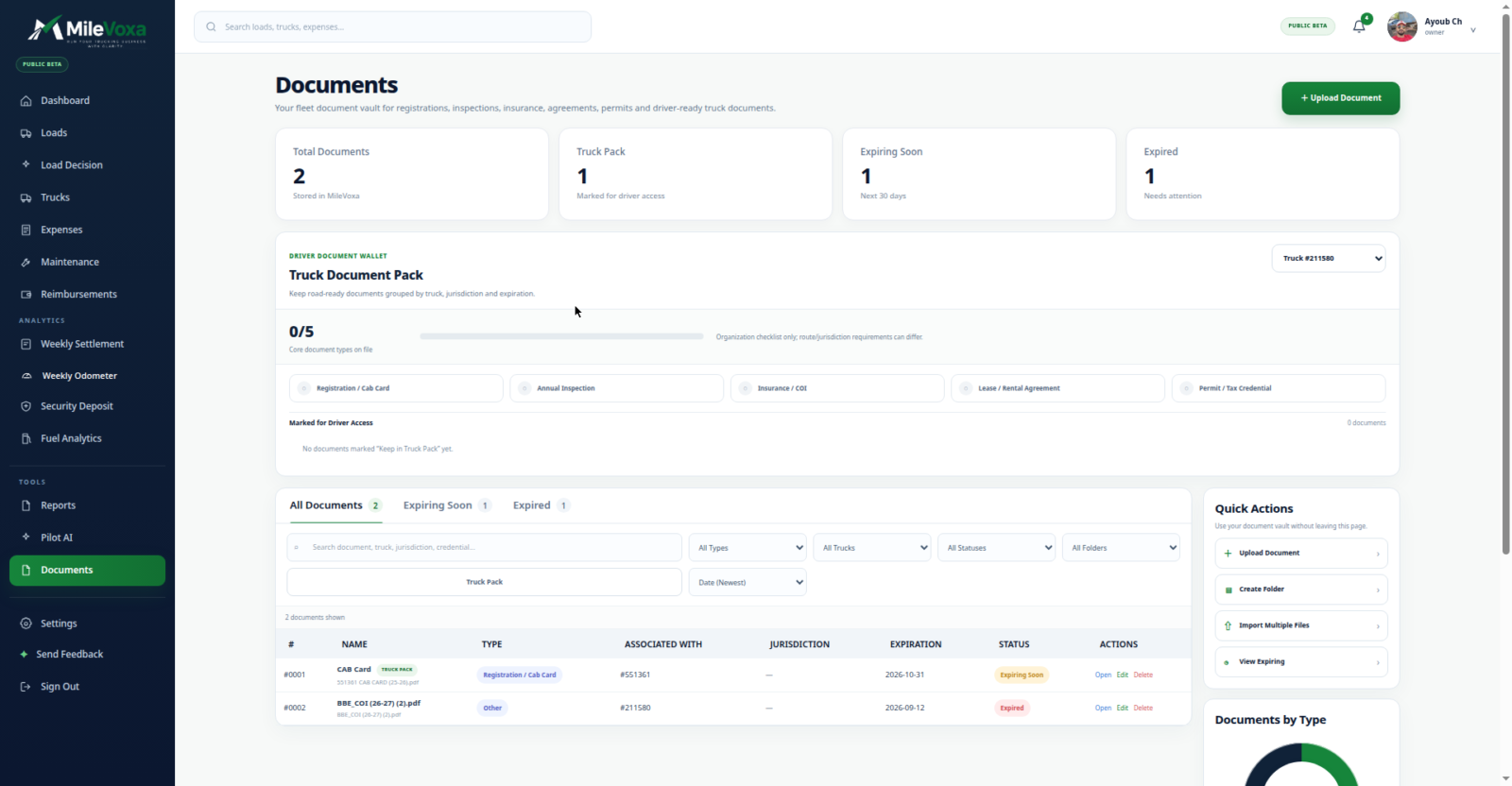
Maintenance records carry overdue and completed status, so a missed PM service stares at you instead of hiding in a folder. Document tracking works the same way: the app flags what’s expiring soon and what’s already expired, per truck, with a checklist of the core document types for each one.
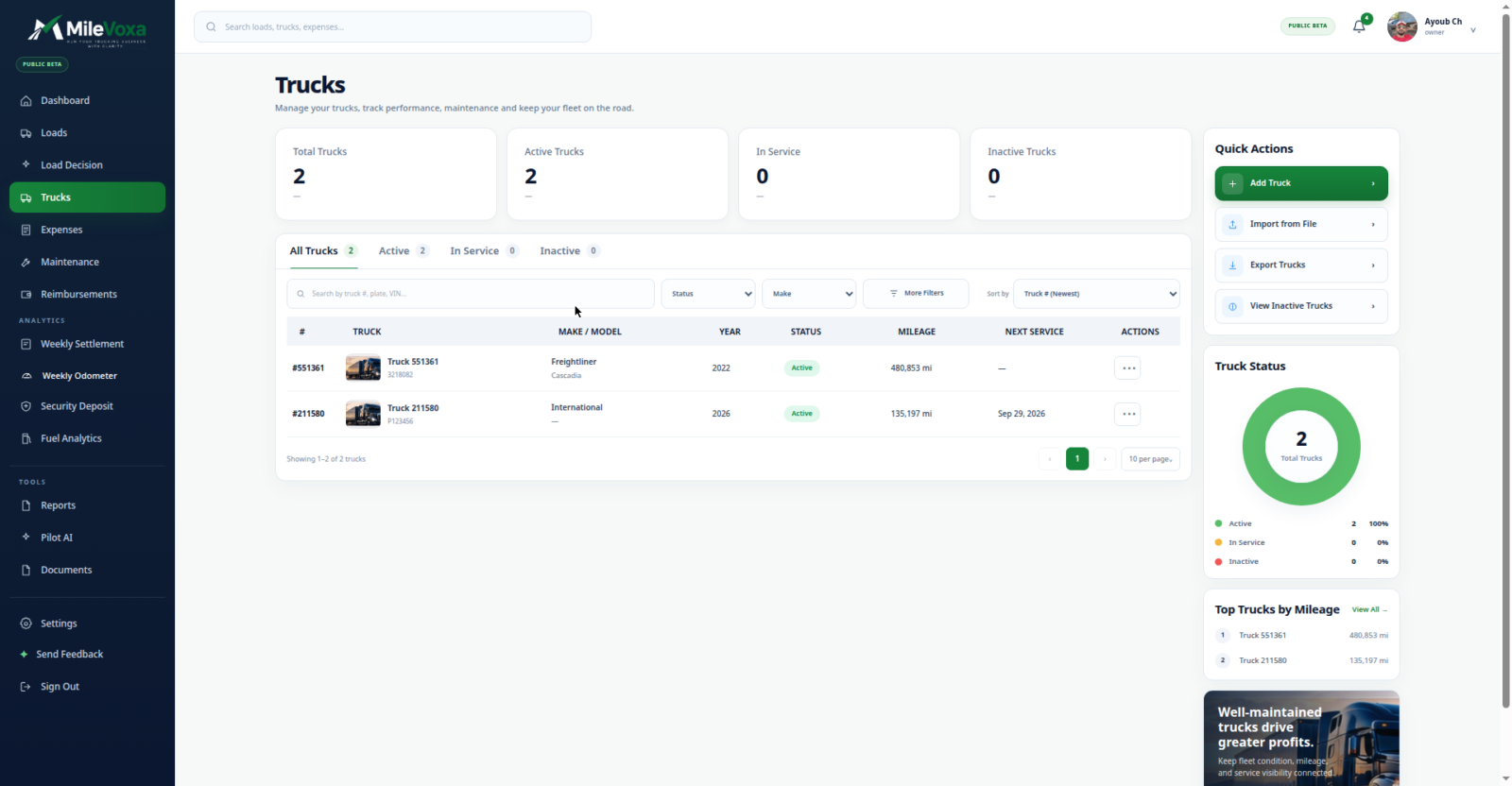
Your trucks, on record
Every truck gets a profile — year, make, model, mileage — so the fleet side of the business lives next to the money side. Maintenance records and documents tie to the truck, not to a folder on your laptop. One truck or five, it’s the same screen.
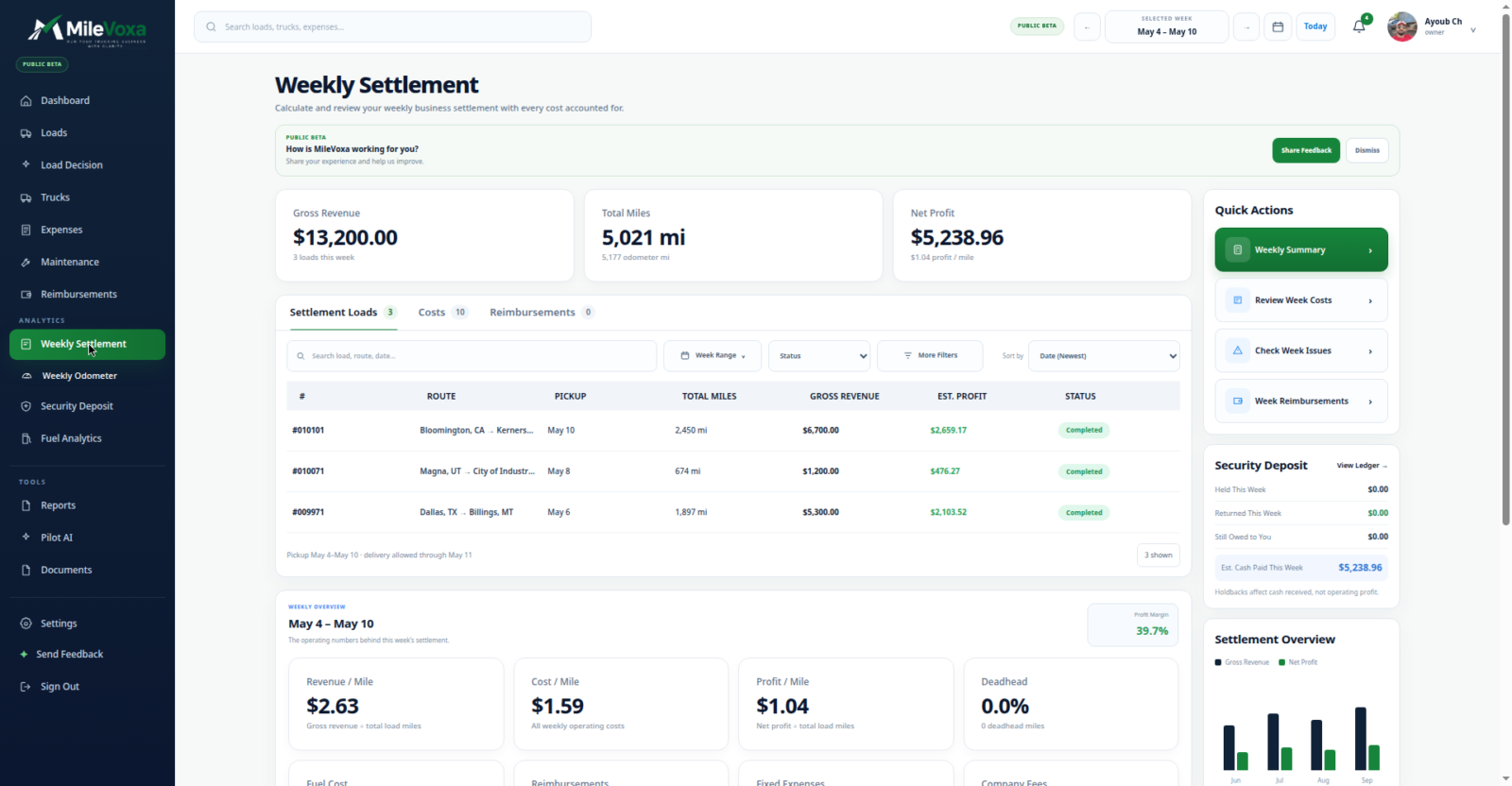
The weekly settlement
The settlement screen lays out the week the way it actually happened: gross revenue, miles, then the costs broken into fuel, fixed costs, company fees, and reimbursements — and the net profit at the bottom, with per-mile numbers. This is the screen that answers the Friday-night question.
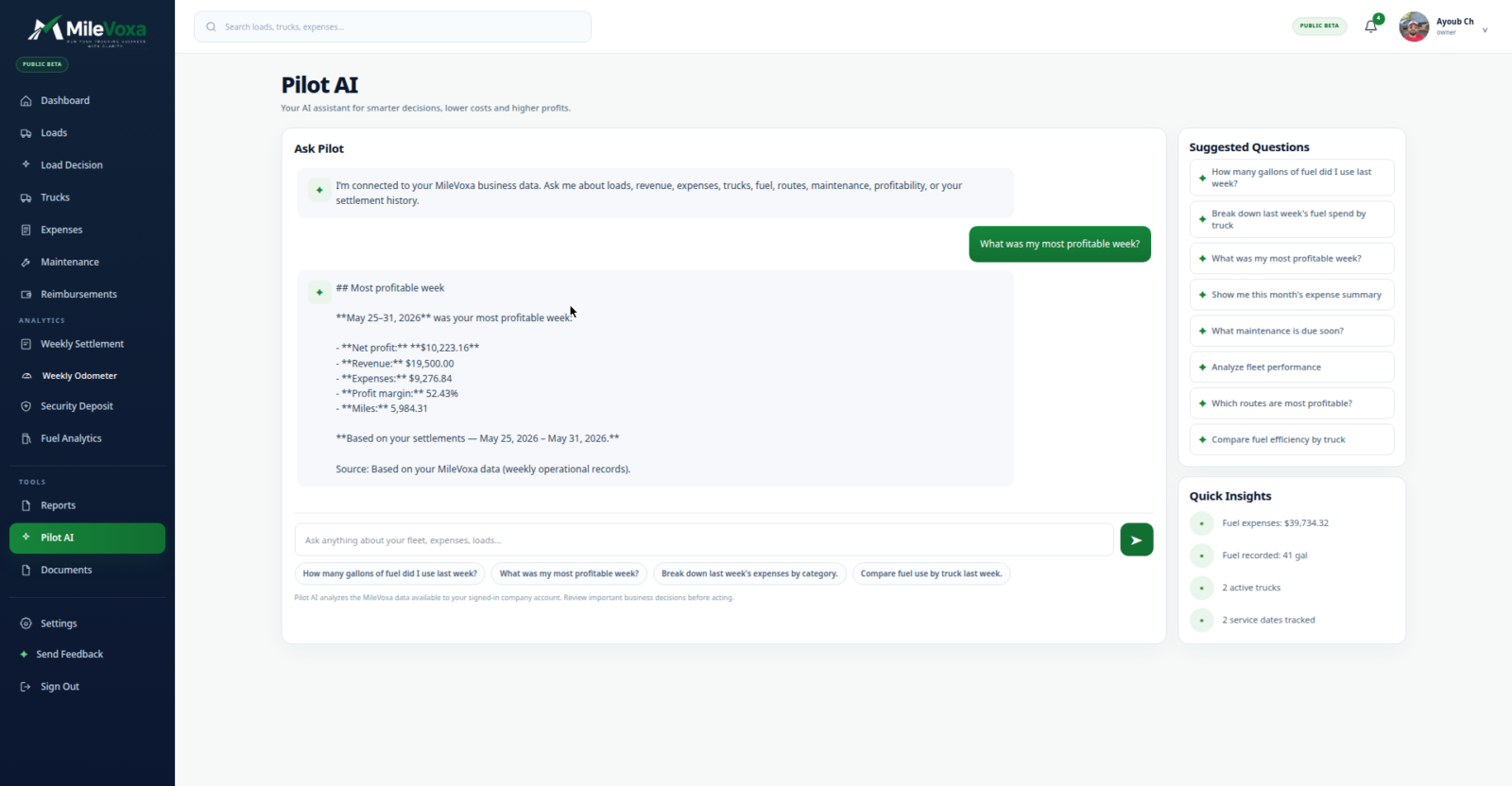
Ask your business questions
Pilot AI is a chat built on your own data. Ask it about your profit, your loads, your expenses, your fleet, your settlements, your documents — it answers with your real numbers and cites them. It covers six areas: profit and performance, loads and revenue, expenses and costs, fleet and maintenance, weekly settlements and odometer, documents and compliance. No generic chatbot answers; it only knows what you’ve entered.
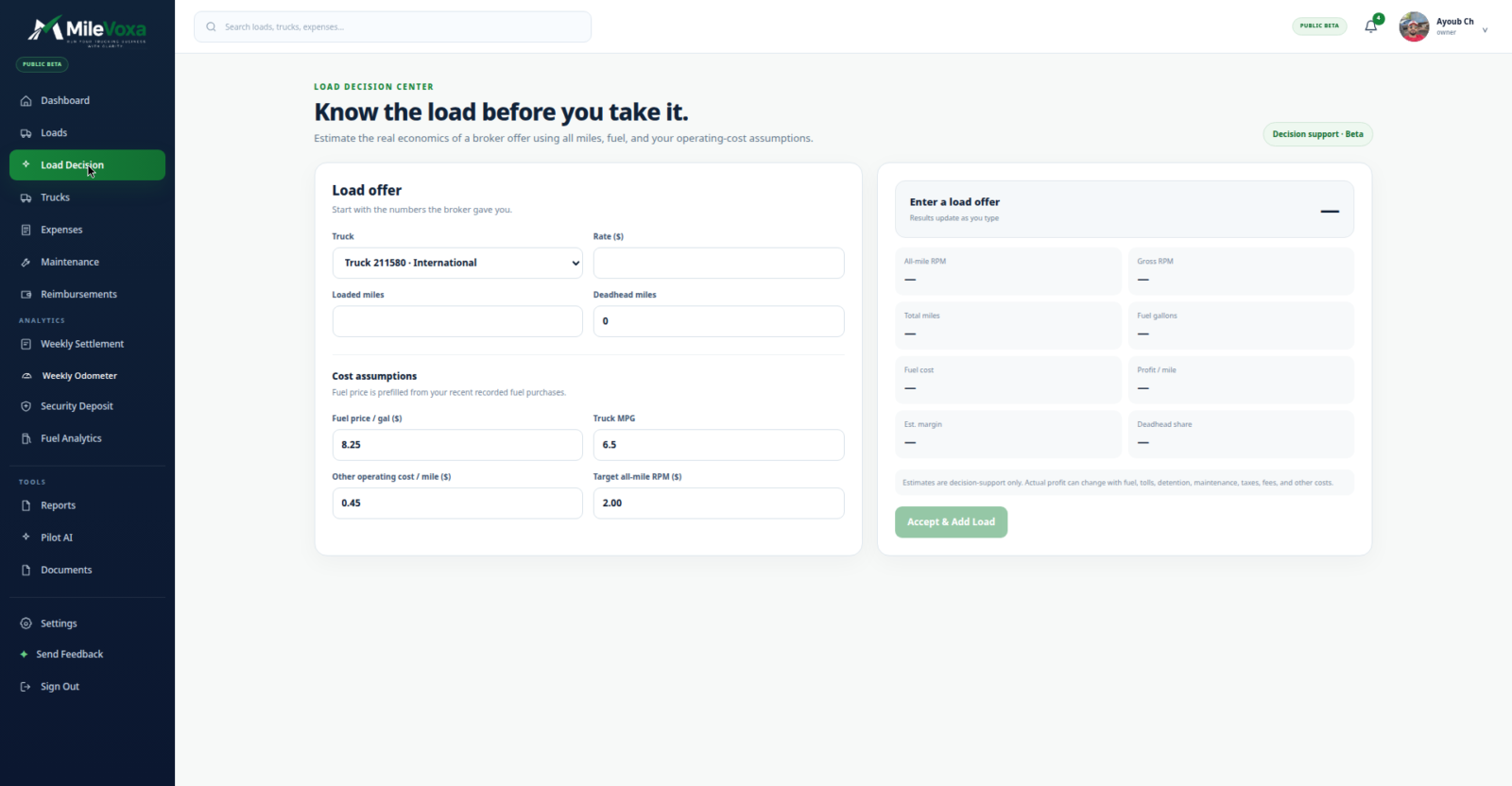
The load evaluator
Before you take a load, the Load Decision tool lets you enter the truck, the rate, loaded and deadhead miles, and your own assumptions — fuel price, MPG, cost per mile, target rate per mile — and it estimates the load. Every assumption is yours to change; nothing is hard-coded.
One honest caveat: I can’t show you a study proving its estimates match real-world outcomes yet. Use it as a second opinion on the load offer, not gospel.
The back-office plumbing
The unglamorous stuff that makes the numbers real: weekly odometer readings that turn miles into a mileage expense. Reimbursement tracking. Security deposit tracking — target, hold method, weekly holdback. Reports you can export as PDF or CSV, built from the data you entered. And there’s an Android app out now, with iOS on the way.
The two profit numbers every driver confuses
This is the thing I most want you to take from this article, whether or not you ever touch MileVoxa.
There are two different profit numbers in trucking, and confusing them is how drivers go broke while feeling rich.
The first is per-load profit: what one load earned on its own — its revenue minus the costs tied to that load, before fixed costs and overhead. In our demo account, one load showed $2,776.55 in per-load profit (before fixed costs/overhead). That number tells you whether the load was worth taking.
The second is net profit: what the week actually kept after everything — fuel, truck payment, insurance, fees, the lot. That same demo week showed $5,238.96 in net profit after all expenses. That number tells you whether the business is working.
Per-load profit answers “was this load good?” Net profit answers “is this business good?” You need both, and you must never mistake one for the other. MileVoxa shows both, labeled — because that confusion is exactly what the spreadsheet years never cleared up for me.
The honest beta box
MileVoxa is in public beta, and it’s free. Here’s what that means, plainly:
- $0. No credit card to sign up.
- No auto-enrollment into anything paid. When paid plans are announced later, joining will be your choice — nothing happens automatically.
- It’s beta. The app is improving every week. If you find a bug, telling us makes it better — that’s the deal.
Pricing will be announced later. That’s the whole pricing section — there’s nothing else to tell you yet, and I’d rather say that than make up pricing that doesn’t exist.
What it isn’t
Two honest boundaries.
First: it’s not tax software, and it’s not an accountant. MileVoxa manages your business numbers — profit, costs, settlements, the shape of the week. For taxes, get a professional who speaks trucking. (If you need help picking a bookkeeping service, here’s how the real ones compare.)
Second: it needs your data to work. MileVoxa computes real profit from the revenue and expenses you enter — there’s no magic import that reconstructs a year you didn’t log. The drivers who’ll get the most from it are the ones willing to enter every load and photograph every receipt. The app makes that fast. It can’t make it automatic.
Frequently asked questions
Is MileVoxa really free?
Yes — it’s in public beta, and the beta is free. No credit card required to sign up.
What happens when the beta ends?
Paid plans will be announced later. Joining them will be your choice — there’s no auto-enrollment, and nothing about your account changes without you saying so.
Who is MileVoxa for?
Owner-operators and small fleets — the people doing the driving and the books. If you’ve got a back office with five accountants, this isn’t built for you.
Do I have to enter everything myself?
Honestly: yes. The app computes your real profit from the revenue and expenses you enter, so the numbers are only as complete as your data. Load entry supports manual entry and file import, and expense entry is built to be fast — but nobody’s automated the discipline part yet.
Is my data safe?
Yes — your data belongs to you and stays yours.
Does it replace my accountant?
No. It’s business management, not tax or accounting software. It tells you what the business made; your accountant tells the IRS.
Is there a mobile app?
There’s an Android app available now, with iOS on the way.
Come try the beta
Full disclosure, one more time: I built this. I’m not going to pretend some neutral reviewer wrote this page.
If you’re an owner-operator or run a small fleet, and you’re still answering the Friday-night question with gut feel — come try the beta. It’s free, it takes no card, and if it doesn’t earn its place on your home screen, delete it and tell me why. That feedback is how it gets better.
- Independent testing
- No sponsored rankings
- Prices verified October 2026